Global Mind Tests

Reaction Time Test

Test how fast you can respond to a visual signal and see how your reaction time compares to typical human averages.

Reaction Time Test

This reaction time test measures how quickly you respond when a visual signal appears. When the area below turns green, click as fast as possible. Your reaction time is shown in milliseconds and can be compared with the average human reaction time.

Click to start

Click the area above. When it turns green — click as fast as possible.

What is reaction time?

Reaction time is the short delay between a stimulus appearing and your response. In this test the stimulus is simple on purpose: a single color change. That keeps the task “clean” — you are not solving a puzzle or choosing between options, you are just reacting.

What this test is really measuring

Even a “simple click” is a chain of events: your eyes detect the change, your brain confirms it, motor areas trigger a movement, and your finger executes the click. Your score in milliseconds is the sum of all these stages, not just “how fast your hand moves.”

Average human reaction time (visual)

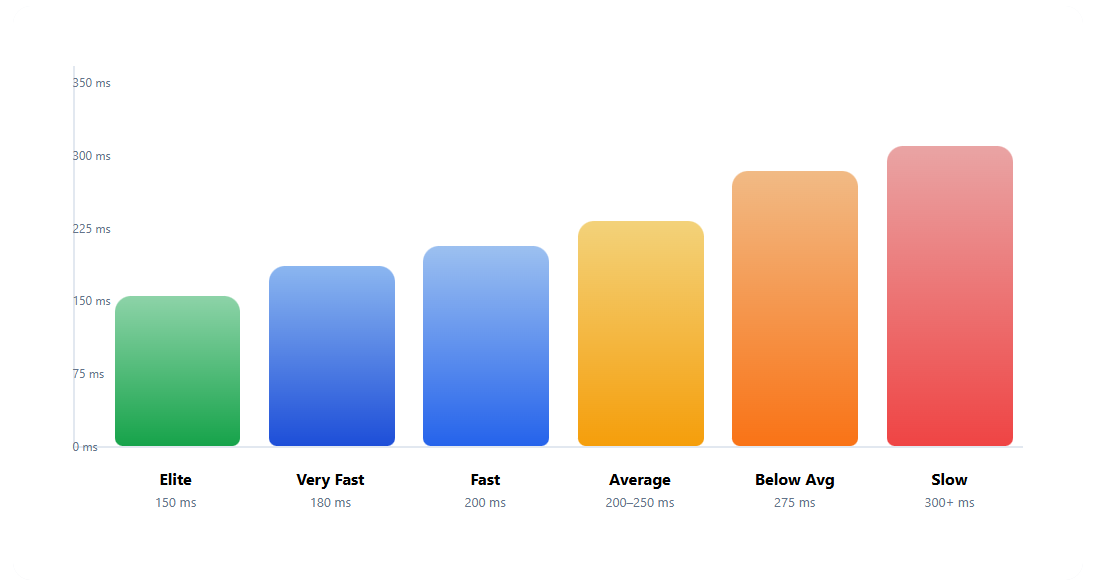
For a simple visual task like this, many healthy adults land around 200–250 ms. Faster results are common in people who practice quick responses (e.g., gamers, athletes), while slower days can happen with poor sleep, stress, or distraction.

Methodology (our protocol)

  • Stimulus: a single color change (red → green) to isolate simple visual reaction.
  • Random delay: the green signal appears after a randomized wait to prevent timing guesses.
  • False starts: clicking before green cancels the attempt (it is not a reaction).
  • Best practice: run 10–15 attempts and use the 10-shot average as your main score.
  • What we save: your reaction times in milliseconds, plus a timestamp for your history table.
  • Fair comparisons: repeat the test on the same device, browser, and input method.

How to interpret your result

Treat one click as “noise” and your 10-shot average as your true baseline. If your results jump around a lot, that usually means fatigue, distraction, or device jitter.

Why we designed the test this way

The waiting time is randomized on purpose. If the green signal appeared at predictable intervals, you could “guess” the moment and click early. Random timing forces a true reaction instead of a timed prediction.

Common mistakes that inflate (or fake) your score

  • Clicking early: it resets the attempt because it’s a false start, not a reaction.
  • Switching devices: different screens and input lag can change results by noticeable milliseconds.
  • Background load: heavy tabs, power saving, or stutter can add jitter to timing.
  • Chasing one perfect click: single attempts are noisy — averages tell the real story.

What this test does NOT measure

This is not an IQ test and not a medical diagnostic tool. It does not measure “intelligence” or “brain health.” It also does not capture complex decision-making — only a basic response to a single visual cue.

Hardware and browser effects (yes, they matter)

Screens have refresh cycles, pixels take time to change, and input devices report clicks at a certain polling rate. These delays are often small, but they can still affect comparisons between different setups. For fair tracking, repeat tests on the same device in similar conditions.

Can you improve reaction time?

You can usually improve consistency and reduce slow outliers. Better sleep, lower stress, and short regular practice sessions help. Most people won’t suddenly become 100 ms faster, but shaving off 20–40 ms over time (and having fewer “bad clicks”) is realistic.

How to use this test over time

The best way to track progress is the 10-shot average. It smooths randomness and shows your typical performance. If your average climbs for several days, it often reflects fatigue, stress, or distraction — not a permanent change.

FAQ

Why does my reaction time change so much?

Sleep, stress, caffeine timing, and attention can shift your results day to day. The bigger effect is often consistency: a few slow outliers can raise the average noticeably.

Is reaction time the same as reflexes?

Not exactly. This page measures a simple visual reaction (see green → click). Reflexes are automatic spinal responses, while this test includes perception and the decision to act.

Why is mobile often slower?

Touchscreens and mobile browsers add latency (screen refresh, touch processing). That’s why comparing phone vs desktop is rarely fair.

Does refresh rate (60 Hz vs 120 Hz) matter?

It can. Faster displays and lower input lag can shave small amounts off the measured time, especially at the top end. Use the same setup when tracking progress.

Can I cheat the test?

You can try to guess the moment, but random timing and false-start resets are designed to reduce timing tricks. The most meaningful number is still your average across many attempts.

Try also

Reaction Test — Level 2 or Memory Test 3×3.